Global middleware on the HTTP client
Requizon registers one middleware on Laravel's HTTP client factory. Http::get(), Http::pool() and the packages that call through them are recorded from the next request, and there is no call to wrap or forget.
You have a dashboard for the requests coming in. Requizon is the one for the requests going out: every third-party API your application depends on, with duration, status, failure classification and the response body of anything that broke, stored in your own database.
$ composer require boring-o11y/requizon
That is the integration. Your HTTP calls stay exactly as they are and are recorded from the next request.
or read the docs first
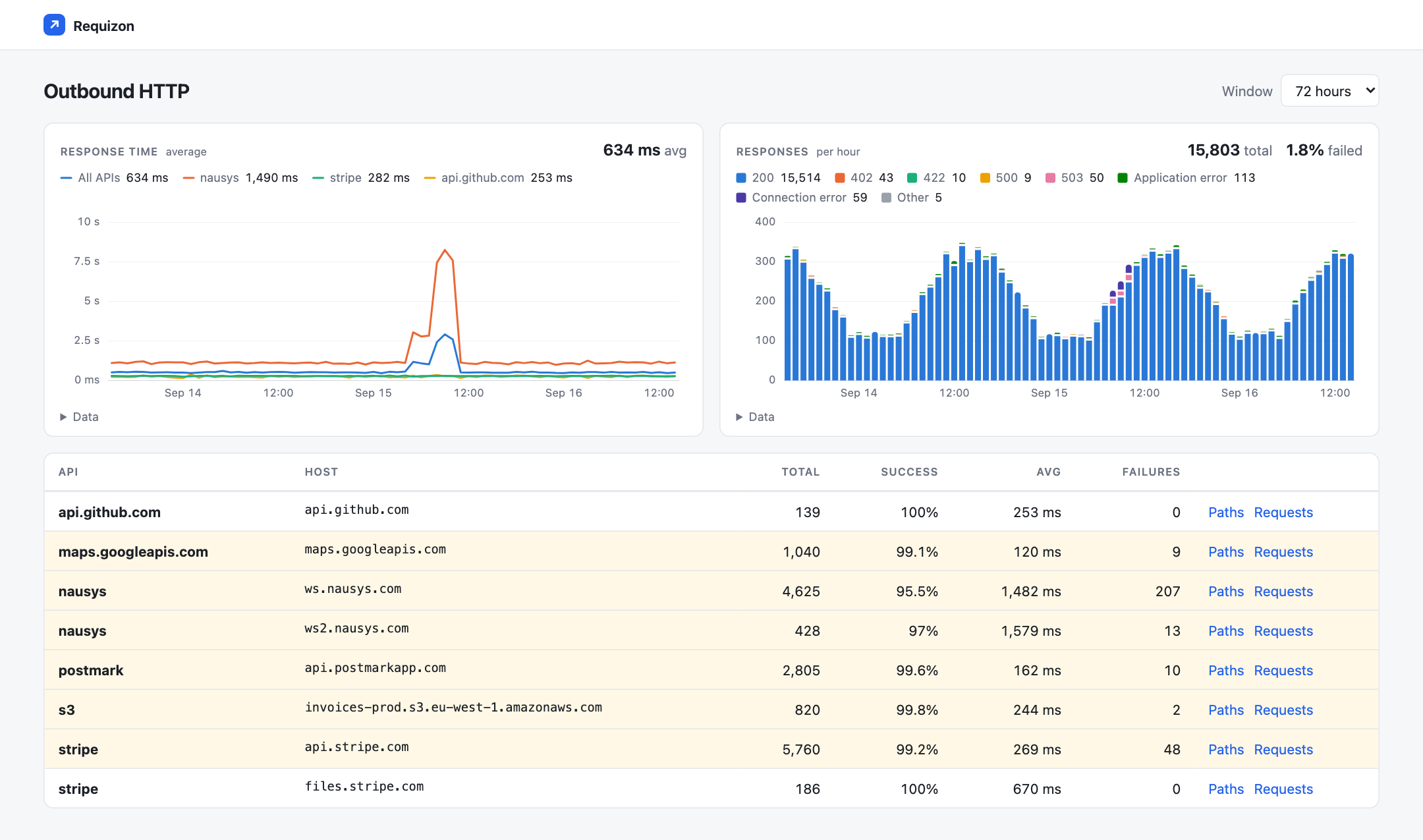
/requizon. The orange line is a vendor's bad morning.
Every call through Laravel's HTTP client is recorded. Nothing to opt in per call.
A dashboard served by your own app, with its own views and assets.
Detail rows and their hourly rollup, in tables in your own database.
There is no agent or third-party account, and the traffic stays on your servers.
Recording cannot fail the call it records. An exception inside the recorder goes to your application's exception handler and is then swallowed, so the worst a Requizon bug can do is lose a row.
When checkout hangs, the first question is whether your code was slow or the payment provider was. Requizon keeps which API was called, on which path, how long it took, whether it failed and what it sent back when it did.
Requizon registers one middleware on Laravel's HTTP client factory. Http::get(), Http::pool() and the packages that call through them are recorded from the next request, and there is no call to wrap or forget.
A host is its own API until you map it. Point api.stripe.com and files.stripe.com at "stripe" and the dashboard lists one API, which opens onto its hosts, paths and individual calls.
A connection that never landed, a 4xx or 5xx, and a 200 with an error in the body are stored as different failure types. A connection error also records its cause, such as a timeout or a failed DNS lookup.
A scheduled command folds calls into hourly buckets keyed by API, host and path, and the charts read their window, from 24 hours to a fortnight, off those buckets. Chart queries do not grow with your call volume.
Detail rows are deleted after 14 days and aggregates after a year, by a command Requizon puts on your scheduler. Paths are stored as /orders/:id, so the rollup does not gain a row for every order.
Requizon adds one middleware to Laravel's HTTP client. Every request the client builds carries it, so the calls you already make are recorded as they are, including the ones buried in a package you did not write. The API name comes from the host, until you give several hosts one name in config.
// Unmapped hosts name themselves: api.github.com
'apis' => [
    'stripe' => ['api.stripe.com', 'files.stripe.com'],
    'nausys' => ['ws.nausys.com', 'ws2.nausys.com'],
    's3'     => ['*.s3.eu-west-1.amazonaws.com'],
],

'ignore_hosts' => [
    '*.datadoghq.com',
],// app/Providers/RequizonServiceProvider.php
Requizon::detectFailuresUsing(function ($body, $response, $request) {
if ($request->getUri()->getHost() !== 'ws.nausys.com') {
return null;
}
return $body['errorMessage'] ?? null;
});
// Recorded as:
// failure_type application_error
// failure_message "PERIOD_NOT_AVAILABLE"
// status_code 200
A depressing number of APIs answer 200 OK
with the real answer buried in the body. Register one callback that knows what failure looks like
for each API, and those calls are classified as
application_error, with the message
the API actually gave you. A 100% success rate then means the calls worked.
Each level of the dashboard charts response time and responses for whatever it lists. Click an API and you get its paths, with the slowest ones drawn as their own lines. Click Failures and the chart narrows to failures by type, so an outage stands out instead of sitting on top of ten thousand successful calls.
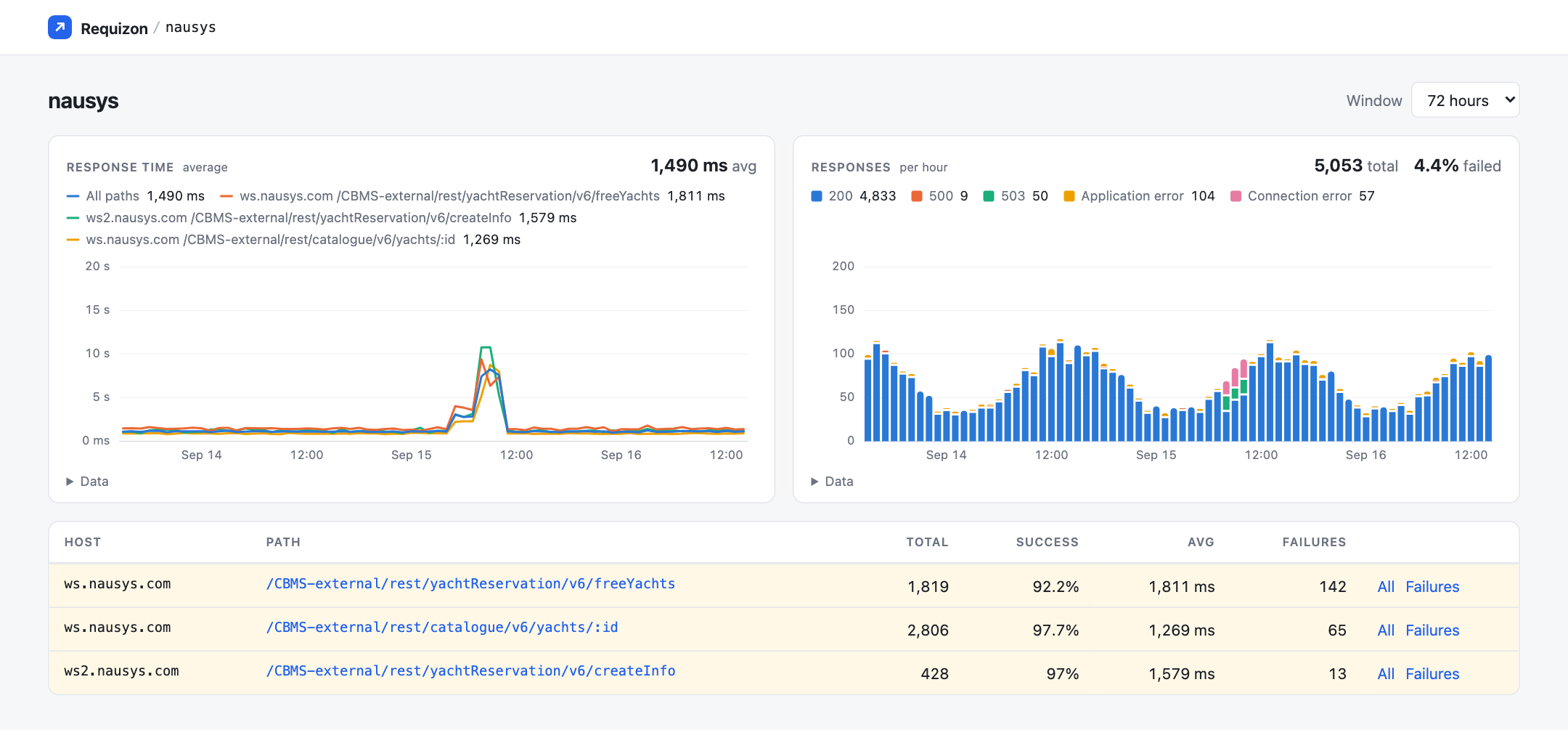
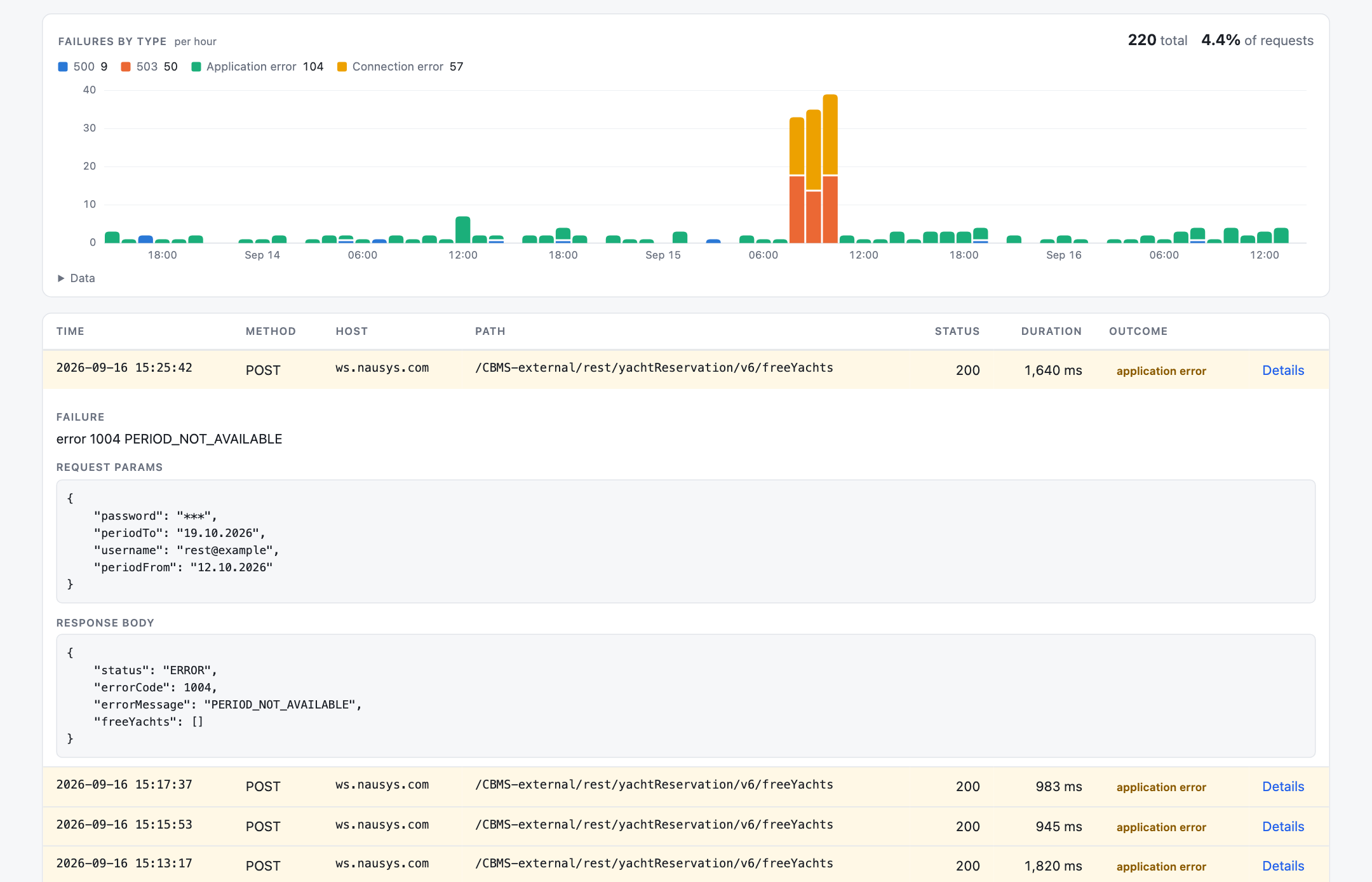
A recorder for outbound calls sits where your API keys and passwords travel. When Requizon cannot tell whether something is a secret, it leaves it out.
Stored
Kept out
"api_key": "***",
"_unparsed": "application/xml, 1482 bytes"
Redaction works by parameter name, so a body Requizon cannot parse into named
parameters (XML, SOAP, text/plain) is stored as its content type and size. Both name lists,
and that default, can be changed in config/requizon.php.
Failed response bodies are not redacted.
They are kept so you can read what the API said, and masking values would make them much harder to
debug. An API that echoes your credentials back, or a 401 from a token endpoint, will put them in
http_requests for as long as your
detail retention allows. Keep that window short and treat the table as sensitive.
What bounds it
A private Composer registry, a migration, a service provider with a gate in it, and the scheduler you are probably running already.
Point Composer at the private registry with your license key.
composer config --global \
  --auth http-basic.requizon.composer.sh \
  you@example.com YOUR-LICENSE-KEY
Pull in the package and create the three tables it reads and writes. Recording starts here.
composer require boring-o11y/requizon
php artisan migrate
Publish the provider, add it to bootstrap/providers.php, then narrow the gate to whoever should see the dashboard.
php artisan vendor:publish \
  --tag=requizon-provider
The dashboard reads a rollup that requizon:aggregate builds every five minutes. Without schedule:run in cron, it stays empty.
* * * * * cd /path-to-app \
  && php artisan schedule:run
class RequizonServiceProvider extends RequizonApplicationServiceProvider
{
    protected function gate(): void
    {
        Gate::define('viewRequizon', fn ($user) => $user->hasRole('administrator'));
    }
}
Until that gate exists, the dashboard answers only in the
local environment, so a forgotten install does not
expose your outbound traffic in production.
The full installation guide →
The payment includes twelve months of upgrades, and what you receive in that year is yours permanently, whether or not you ever renew.
Secure checkout by Anystack, with cards and VAT invoices.
Requizon is a Laravel package that gives you a dashboard for your application's outbound HTTP traffic. It records every call made through Laravel's HTTP client: duration, status, failure classification, redacted request parameters, and the response body of anything that failed. It rolls that up into hourly buckets and serves a self-contained UI at /requizon. It is made by Boring Observability, who also make Skyline for Laravel.
It registers a global middleware on Laravel's HTTP client factory, so every request built through the Http facade carries it, Http::pool() included, with nothing to change at the call site. Recording rides on Guzzle's on_stats hook, which fires once per transfer after the response is in hand, and also fires when the connection fails outright and there is no response at all. SDKs that build their own Guzzle client are covered by pushing the same middleware onto their handler stack.
Yes. List them in ignore_hosts in config/requizon.php, as Str::is() patterns such as *.datadoghq.com, and matching calls are not recorded at all. Your telemetry backends belong there first: an exporter shipping logs or metrics over HTTP would otherwise record its own traffic.
Recording is a single insert after the transfer completes, and the aggregation that makes the dashboard fast runs out of band on the scheduler. Every failure inside the recorder is reported through your application's exception handler and then swallowed, so an instrumentation problem can never break the call it is observing. Successful response bodies are only read if you register a failure detector, and streamed responses are never read.
No. Requizon is a package running inside your application, writing to three tables in your own database, and serving its own dashboard from your own domain. There is no agent, no SaaS account and no egress. That also makes it usable on traffic you are contractually not allowed to send to a third party.
Three things, recorded distinctly. A connection_error is a transfer that never produced a response at all: DNS, TLS, timeout. An http_error is any response with a status of 400 or above. An application_error is a successful HTTP response that your own callback classified as a failure, which is how you catch APIs that answer 200 OK with the error in the body.
As little as it can. Headers are never stored. Request parameters whose name contains pass, secret, token, apikey, api_key or auth, and those named exactly p, l or pwd, are stored as ***; both lists are configurable. A request body Requizon cannot parse into named parameters (XML, SOAP, text/plain) is recorded by shape only, because redaction works by parameter name. The exception is the response body of a failed call is stored as-is, so a 401 from a token endpoint that echoes your credentials will land in the table. Keep detail retention short and treat the table as sensitive.
Telescope stores each outgoing call in full, and its default filter keeps none of them outside the local environment. Laravel Nightwatch does record outgoing requests in production, grouped by host with status counts and response times, as one part of a hosted APM that sends your data to Laravel and recommends sampling it. Requizon records only outbound calls, all of them, broken down by API, host and path and by failure type, in your own database. It pairs well with either: the APM tells you a request was slow, and Requizon tells you how that vendor has been behaving all week.
PHP 8.2 or newer, Laravel 12 or 13, and MySQL 8.0.20+ (or a compatible MariaDB). The hourly rollup uses INSERT ... ON DUPLICATE KEY UPDATE with row aliases, and the aggregate command fails with a clear message on any other driver.
By default, individual request rows for 14 days and hourly aggregates for a year. Both are pruned daily by a command Requizon schedules for you, and both retention windows are configurable. Re-aggregating a window is idempotent, so overlapping runs are safe.
Requizon is a one-time purchase of $9.99 per application. The purchase includes twelve months of upgrades. Everything published during those twelve months is yours permanently: you can keep running it and reinstall it whenever you rebuild. Renewing is optional and buys only the next year of releases. The checkout is hosted by Anystack, which also issues the license key.
Yes. Every purchase comes with a 30-day money-back guarantee. Email tech@boring-observability.dev within 30 days of being charged and we refund it in full, no questions asked and no call to sit through.
Whoever your viewRequizon gate says can. You publish a service provider, define the gate against your own roles or user check, and Requizon consults it on every dashboard request. Until that gate exists the dashboard is reachable only in the local environment.
Checkout takes a minute and ends with your license key. One composer require later, your outbound calls are on a dashboard.
Secure checkout by Anystack. 30 days to change your mind.
Questions first? Email us and one of the people who builds it will answer.